In brief
To sell to the city you register a supplier account on Long Beach Buys, the city’s purchasing portal, and add NIGP commodity codes so bid notices reach you by email. The portal states: “Vendors must be registered in the system to respond to bid solicitations posted by the City of Long Beach”.
- Registration asks for a Tax ID (EIN or SSN), company name, email and country, then a validation email and, once the account is activated, an automated email2.
- Notices follow NIGP codes: “There is no limit to the amount of codes you select”5.
- Small-dollar purchases are those “under $40,000” handled by informal quotes; the limit was raised “from $25,000 to $40,000” in an October 7, 2024 release, though portal help still says $25K589.
- Help with submitting is free at [email protected] or (562) 570-6200, and a “Doing Business with the City” webinar runs on the third Thursday of each month510.
- The city’s pages define ITB as an award to the “lowest responsible bidder” and RFP as an award on “best value”8.
Long Beach Buys is where the city posts its bids, requests for proposals and quote requests, and where a vendor has to be registered before it can answer one. This page follows the registration as the city’s two-page guide states it, the commodity codes that decide which notices arrive, the small-dollar rule, and what the city’s own pages mean by ITB and RFP. It belongs to the pillar, Selling to the City of Long Beach and the Port. The Port runs a separate registration, covered in Becoming a Port of Long Beach Vendor. Everything below is as of October 2026.
The short answer
| If you are… | Do this |
|---|---|
| Any business that wants city work | Create a supplier account on Long Beach Buys; the portal says vendors “must be registered in the system” to respond to a solicitation1 |
| Wanting bid emails for your trade | Add NIGP commodity codes to the profile; the system emails when a new opportunity carries one of them5 |
| Wanting quote requests under $40,000 | Answer the “Interested In Projects” question in Maintain Terms and Categories, which the portal still words as “$25K or less”58 |
| A subcontractor | Register first; a prime can add only a subcontractor that is itself a registered supplier7 |
| Selling to the Port | Register separately: the Port runs its own PlanetBids account, which it describes as free14 |
Who has to register, and what it costs
The portal’s public notice reads: “Vendors must be registered in the system to respond to bid solicitations posted by the City of Long Beach”1. The guide says “suppliers must register in Long Beach Buys to receive bid solicitation and purchase order notices, respond to them and do business with the City of Long Beach”; open registration began February 16, 20222. The public bid search also lists “Long Beach Utilities Department”, so Utilities solicitations appear in the same portal4.
A June 8, 2022 city press release describes the platform as “A new purchasing platform and marketplace that is free for all businesses and organizations seeking to do business with the City”3. None of the registration steps below asks for a fee. Guides are offered in English, Spanish, Khmer and Tagalog1.
Step 1. Create the account
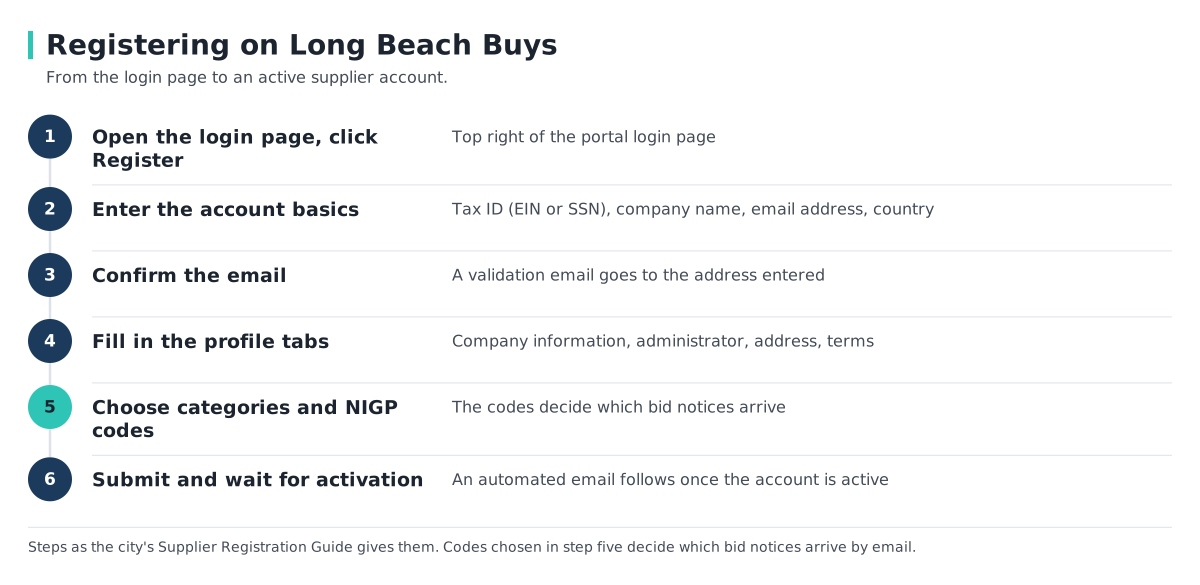
The city’s Supplier Registration Guide gives the opening steps2:
- Open the portal login page and click “Register” in the top right.
- Enter the account basics. Select EIN or SSN for the Tax ID (a foreign vendor with no U.S. Tax ID enters its foreign one), then Company Name, Email Address and Country. The login page adds that “SSN is not allowed for international vendors”1.
- Use an email address you can open. The guide says: “Ensure you can access this account during the registration process. A validation email will be sent to this address.”2
- Click Register to move on to the profile tabs.
Step 2. Fill in the profile tabs
The guide lists the tabs in order2:
| Tab | What it asks for |
|---|---|
| Company Information | Company name, legal name, tax ID, mailing address and a company email, which receives “Bid opportunity notifications” |
| Administrator | The account administrator’s name, email, phone, user ID and password; the guide says to leave the box about registering for S2G unchecked |
| Address | Address details for the account |
| Terms | Click “Save & Continue Registration” |
Step 3. Choose categories and NIGP codes
The Categories & Certifications tab says: “Select those categories and certifications applicable to your business.” The Commodity/Service Codes tab says: “Enter the commodity codes related to your business that you want to receive bid solicitation opportunity notifications.”2
The city uses NIGP codes, not NAICS. Its troubleshooting guide says: “Setup your vendor profile with NIGP codes. This will automatically email you when new opportunities are posted with those NIGP codes.” and “There is no limit to the amount of codes you select”5 The city publishes a 208-page list headed “NIGP CODES COLB”; bold or blue cells are broad classes and all others are specific class and item codes within a class6. Live bids carry a class-item code, such as “925-00 ENGINEERING SERVICES, PROFESSIONAL” on a Public Works construction bid12.
Codes are edited later in the Seller Admin role: “Maintain Organization Information”, then “Maintain Commodity codes & Services”, then “Maintain Commodity Codes”5.
Step 4. Submit and activate
The Summary tab is the last one: review it and click “Submit Registration”. The guide adds: “You will receive an automated email once your account has been activated.”2 At first login a temporary password arrives from [email protected] (“Check your spam folder”); sign in, change the password and, again, leave the S2G box unchecked. The administrator can add users under “Maintain Users on this Account”2.
A vendor who stops mid-way uses the “Complete Registration” link near the bottom of the portal page, which needs the Supplier ID and email15.
How notices reach you
System emails come from [email protected]; check spam and trash5. Mechanics from the city’s guides:
- Amendments. Clicking “Yes” on the “Acknowledge Receipt and View Solicitation” screen opts the vendor in to amendment emails: “If an amendment occurs, the user who acknowledges receipt of the Bid Solicitation is emailed”7.
- Quotes. Responses are called “Quotes”. A submitted quote cannot be edited, but “the Seller may withdraw the Quote (for editing and resubmission) at any time before the Bid Opening Date and Time”7.
- Who bid. “You will not be able to see who bid on a solicitation until the Notice of Intent to Award (NOI) has been released,” which “can take multiple weeks to months depending on how many quotes need to be evaluated”5.
The city also keeps a list of upcoming contracting opportunities so vendors can plan ahead15.
The small-dollar rule: $40,000, and the wording that still says $25K
The city’s Local and Small Business Assistance page describes small-dollar purchases as those “under $40,000 that are handled through an informal procurement process where the City selects vendor who submits the best value quote”8. The October 7, 2024 press release says the city was “increasing the threshold for small-dollar purchases from $25,000 to $40,000”9. Local businesses get a 10 percent preference against other quotes; the rules are in How City of Long Beach Bidding Works8.
To receive these requests, the troubleshooting guide says to log in as Seller Admin, open “Maintain Organization Information” then “Maintain Terms and Categories”, and answer “Interested In Projects at $25K or less” with “Yes- I want to submit proposals for solicitations valued at $25K or less”5.
Official pages disagree The portal’s troubleshooting guide still words the quote-request setting as “$25K or less”, while the city’s assistance page and the October 7, 2024 press release put the small-dollar limit at $40,000589. The city’s pages do not say whether the setting’s label has been updated. The $40,000 figure is the city’s current statement of the limit; the setting is the one the guide names for receiving small quote requests.
The local preference depends on a current City business license; see How to Apply for a Long Beach Business License8.
What ITB, RFP and quote mean on the city's pages
The city’s assistance page defines two formal terms8:
| Term | The city’s definition | Awarded on |
|---|---|---|
| ITB (Invitation to Bid) | “for goods where contract is awarded to lowest responsible bidder” | Price, among responsible bidders |
| RFP (Request for Proposals) | “for goods or services where a contract is awarded based on vendor’s ability to provide the best value to the City” | Best value |
Source:8. The city’s RFP template defines the term as “Request for Proposals” and says “may” and “must” mean permissive and mandatory11. Public-works bids appear as “05 – RBID – Construction Bid”12. Informal small-dollar buying is described as “quotes”8.
Two terms are not defined on the pages read. The city’s purchasing pages do not define “RFQ”; Long Beach Utilities uses it to mean “Request for Qualifications”13. The pages read use ITB and do not use “IFB”.
Free help and the monthly webinar
The troubleshooting guide answers the question about one-on-one help with “Yes, support is free” at [email protected] or (562) 570-62005. Customer help runs 8 a.m. to 5 p.m., Monday to Friday1. The Purchasing Division’s Vendor Support page lists a “Doing Business with the City” webinar “held every Third Thursday of the month on Zoom”, covering contracting processes, Long Beach Buys and business licensing10. The October 7, 2024 release gave the time as 11 a.m.9.
Frequently Asked Questions
Do I have to register on Long Beach Buys to bid?
Yes, to respond to city solicitations: “Vendors must be registered in the system to respond to bid solicitations posted by the City of Long Beach”1.
How do I get automatic email notices for bids?
Add NIGP codes to the vendor profile; the system emails when a new opportunity is posted with those codes, and there is no limit on the number of codes5.
How do I receive quote requests for small jobs?
I did not finish signing up and cannot log in. What now?
Why am I not receiving emails from Long Beach Buys?
Look for [email protected] in spam and trash5.
Can I get help submitting a quote?
Yes, free: [email protected] or (562) 570-62005.
Related Articles
Sources
- Long Beach Buys portal home and public bulletins — City of Long Beach (Periscope S2G). Accessed 2026-10-02.
- Long Beach Buys Supplier Registration Guide (PDF) — City of Long Beach. Accessed 2026-10-02.
- Long Beach Launches New Procurement Software, Long Beach Buys (June 8, 2022) — City of Long Beach. Accessed 2026-10-02.
- Long Beach Buys public bid search — City of Long Beach. Accessed 2026-10-02.
- Long Beach Buys Vendor Troubleshooting Guide (PDF) — City of Long Beach. Accessed 2026-10-02.
- NIGP Codes COLB (PDF, 208 pages) — City of Long Beach. Accessed 2026-10-02.
- Long Beach Buys Bid Solicitation & Quotes Guide (PDF) — City of Long Beach. Accessed 2026-10-02.
- Local and Small Business Assistance — City of Long Beach, Purchasing Division. Accessed 2026-10-02.
- City Expands Local Preference Program for Procurements (October 7, 2024) — City of Long Beach. Accessed 2026-10-02.
- Vendor Support — City of Long Beach, Purchasing Division. Accessed 2026-10-02.
- City RFP template v8.12.22 (PDF) — City of Long Beach. Accessed 2026-10-02.
- Bid PW-26-787, R-7280 Pacific Avenue Corridor Improvement Project — City of Long Beach (Long Beach Buys). Accessed 2026-10-02.
- Long Beach Utilities Purchasing — Long Beach Utilities. Accessed 2026-10-02.
- Compete with Confidence — Port of Long Beach vendor portal. Accessed 2026-10-02.
- Upcoming Contracting Opportunities — City of Long Beach, Purchasing Division. Accessed 2026-10-02.